Sunday, January 9, 2011

Happy Birthday, Wikipedia!


In India, the 10th anniversary is celebrated in 35 cities
At the turn of the decade, many busied themselves drawing up lists of top tech marvels that defined the decade that was. Amid a plethora of smart phones, tablet PCs and glitzy gadget that got us into a tizzy, with every upgrade and social networking sites that went micro towards the end of the decade is one that has grown consistently and collaboratively over the decade. So much so that many can barely imagine the Internet without Wikipedia, their ‘know-it-all' buddy.
On January 15, Wikipedia turns 10. While it may not let you share your party pictures or curb your thoughts to 140 characters, compared with other younger success stories of the Internet, this massive encyclopaedia has revolutionised the concept of gathering and sharing knowledge online.
Today, the site that ‘anyone can edit' has 17 million articles in more than 270 languages. This, of course, has been made possible by an army of Wiki foot-soldiers from around the world — the site has a staggering 1.3 crore registered editors.
This week, the Wikimedia Foundation — the 50-staffed office that pulls the strings from behind the scenes — completed its most successful fund-raiser to date, amassing $16.55 million in over a month.
Besides the fact that Jimmy Wales (and his request for contributions) will not take up your Wiki screen space now, it means that the Foundation can continue to deliver pages that are advertisement-free. Wikipedians, who are all about the “love of the community,” proudly point out that the average contribution remains $22.
Says Bhishakha Dutta, member of the Wikimedia Foundation: “It is important that we don't have ads because for Wikipedia what is critical is our promise of a ‘neutral point of view.' So we need the money to maintain servers or software upgrades, but it's important that this too comes from the community. This goes with our larger philosophy.”
Contributions were received from 140 countries this year. “We think of ourselves as a movement,” she says.
Close on the heels of Facebook opening an office in Hyderabad, Wikipedia too announced plans to set up its first off-shore office outside the U.S, in India. While the buzz is that either Mumbai or Hyderabad will host Wiki's India home, the Wiki community does not really care, for it knows that Wikipedia's true offices are on the computers of thousands of volunteers who work ‘overtime' to enrich the encyclopaedia.
In India too, the enthusiastic community of Wiki volunteers is holding offline meet-ups and public functions to mark the 10th year of Wikipedia. The list of cities where these programmes are being conducted is itself a testament to how far the Wiki word has spread, and why Indian language Wikipedias — there are more than 20 today — have been growing substantially in the past two years. While the major cities are well represented, smaller towns and cities such as Rohtak, Bhilai, Jamnagar, Jammu and Kurukshetra are also hosting events.

Browsing tips for better productivity


You probably spend a good amount of your computing time within the confines of a web browser. But are you making the most of that time? You’re not if you are relying on the same old browser habits that you developed years ago. The good news: There are plenty of ways in which you can supercharge your web browsing without resorting to a bunch of tricks that you’ll likely forget. Read on to learn more.
** Discover caret browsing One of the best-kept secrets of both Internet Explorer (IE) and Firefox is the caret browsing feature. Caret browsing essentially makes web pages more keyboard friendly -- and web surfing a lot more productive, particularly if you spend much time at all selecting and copying text or graphics from a website.
With caret browsing activated, a text cursor appears within any web page, and moving the cursor around and highlighting text and graphics are very similar to performing the same actions in a word processing document. In caret mode, the Tab key moves you from one major section of a web page to another, and the Enter key will activate any link on which the cursor is positioned.
You can activate (and de-activate) caret browsing by simply pressing the F7 key in both IE and Firefox. Google’s Chrome has a version of caret browsing that involves first selecting some text and then using the Shift and arrow keys to select more.
** Launch into full screen Most elements of web browsers -- menus, toolbars, status bars, and the like -- are useless clutter once you’ve landed on a page that you want to read. To get rid of the clutter, simply tap the F11 key. All of the major browsers will launch into “full screen” mode, showing you just your web page and none of the browser controls you don’t need. Press F11 again to return to the browser’s previous state.
With Internet Explorer, you can still access your menus with in full screen mode. Just use the keyboard shortcuts (Alt-F, Alt-E, and so on), and the menus will hover over the web page.
** Outsmart ads One of the biggest time-zappers while surfing the internet today is waiting for ads to load -- or waiting for them to leave you alone so that you can get to the content you need.
You can get rid of most ads altogether in a couple of ways. First, if you’re a Firefox user, head straight for Adblock Plus (http://bit.ly/12oUg). Install this plugin, and in no time bothersome ads will be a distant memory. This plugin can’t zap all ads, but it takes care of most of them. Chrome users also now have a beta version of Adblock plus (http://bit.ly/7EABcN) that they can try.
If you’re using IE, try Ad Muncher (http://bit.ly/3aCI27), which is also compatible with most other browsers.
** Use the keyboard Think about the operations you perform repeatedly in your browser using the mouse. There are probably keyboard shortcuts for most of them that can save you a lot of time.
Do you frequently return to your home page, for example? Hold down the Alt key and tap Home (Alt-Home) Need to find something on a web page? Ctrl-F activates the Find box. Need a new tab? Ctrl-T takes care of it. And how about switching among open tabs? Ctrl—Tab does the trick. These tricks work in all of the major browsers.
** Try a form filler Web forms are everywhere these days, and most of them ask for the same information: your name, address, e-mail address, and perhaps your credit card if you’re purchasing something. Make short work of entering all of that information by enlisting the help of a form filler. The two best ones are LastPass (http://lastpass.com) and RoboForm (http://www.roboform.com).
** Adopt multiple browsers You might love IE. You may swear by Firefox. You may be intrigued by Chrome. Regardless of which browser you prefer, one of the other browsers likely has a feature (or a add-on) that will let you get your work done faster.
There’s no reason these days not to be acquainted with all of the major web browsers. That would be IE, Firefox, and Chrome. They’re all free. They all get along with one another when installed on the same computer. And thanks to a diverse and talented development community, they all have add-ins or plugins that provide unique features that are not available on other browsers. Just spend some time at the Add-ons for Firefox page (http://bit.ly/6dgS) or the Google Chrome Add-ons site (http://bit.ly/YY5JR) to get a taste of what’s out there.

Buying a cheap laptop without Windows: Is it worth it?

A cheap laptop with a reasonable level of hardware, but no Windows operating system: bargain hunters can often find offers of this type on the internet. They are definitely worth checking out -- presuming you have the patience to work with alternative operating systems such as Linux and have time to perform installation.
The decision to forego Windows is the reason for the noticeably low prices of these offers. Manufacturers can save themselves the license fees that they otherwise must pay to Microsoft for each installation of Windows.
“The low-end laptop market in particular is so hard fought that manufacturers will grab for any dollars they can save,” explains Elmar Geese, chairman of the Linux association in Berlin. In place of Windows, the laptops come either without an operating system or use a pre-installed variant of the typically no-cost alternative operating system Linux.
For the user, that means a bit of extra work and acclimation.
Simply installing Windows from the old computer is generally not an option. Most Windows installations are tied by license to the computer with which they were sold.
Axel Pols from the German IT industry association Bitkom views devices without operating systems with some skepticism. Laptops have come to be so affordable that there’s no real need to go without an operating system, he says.
It’s important to look at more than just the price. “You should give careful consideration before making a purchase about how big your laptop should be and what it should be able to do,” says Pols.
Those considerations then form the basis of a purchase decision.
Does it absolutely have to be a Windows computer? No, says Geese.
“Mature Linux distributions like Ubuntu can now completely replace Windows.” Given that certain conventions have established themselves in recent years across all operating systems, there’s not even a great deal of acclimation needed. Macs, Windows, computers and even smartphones are all remarkably similar to use in many ways. “Linux distributions aren’t reinventing the wheel in this regard,” Geese says.
The decisive point for Linux laptops is finding the right “distribution.” To say a computer “works with Linux” is a misnomer, since there’s no such thing as a straight Linux version to be installed. Instead you have to opt between different software packages based on Linux, known as distributions.
Popular variants include for example Ubuntu, Open-Suse, Debian and Mandriva. All contain a variety of software to accompany their graphical user interface: a browser, an email program, a multimedia player and office packages are all on board from the start. Many distributions can be downloaded for free off the internet.
Many providers make it difficult for users to determine which distribution is actually installed on the laptop. For Thorsten Leemhuis, editor at Germany’s c’t computer magazine, this is an important weakness in these offers: “Just stating ‘Linux’ doesn’t help you at all,” he says.
Many devices come with a version of the Linux OS that doesn’t work on the device at all. One example is the Linpus distribution, a stripped-down variant that is primarily intended for the Asian market.
Normal users should probably stay away from those offers, Leemhuis recommends. “The interplay between computer and software has grown very complex. If they’re not optimally attuned to one another, you’ll quickly have problem.” Regardless of whether you’re using a Windows or Linux distribution, the key is a stable and sensible installation. If you are just looking for a machine that works, then it’s a better idea to avoid devices that still need a real operating system installed onto them.

Tuesday, January 4, 2011

Windows 8 Milestone 2 already compiled


  It isn't a secret that Microsoft is working on the successor to Windows 7, but the progress so far has remained a secret.
Windows 8, the codename for the next major operating system from Microsoft, may have already passed Milestone 2 progress. According to a Russian website winreview.ru, via win8beta.com, Microsoft compiled the build "Windows 8 Milestone 2: 6.2.79xx.0.winmain_win8m2.xxxxxx-xxxx" recently.
News of this build comes just days before CES 2011, meaning Microsoft might have a sneak preview for a select few, but the chances are very unlikely. The emerging details mean that Microsoft is already working on Milestone 3, which is expected to be completed by the end of February 2011.
Not too many details have leaked out about Windows 8, but its new UI might be called "Wind," where Microsoft plans to create a 3D desktop. Other details suggest that Microsoft might be integrating Windows 8 to the cloud, selling the operating system as more of a service, making deploying and updating a simple task.
Neowin will be live at CES 2011 this week in Las Vegas.

Sunday, January 2, 2011

How your visits to sites are tracked

When Aparna (name unchanged), a lawyer, typed her name in Spokeo's search box, the results shocked her. The address where she had stayed in the United States — a piece of information she thought was not public — was there on the map for anyone to see.
Spokeo (www.spokeo.com) says it is “not your grandma's phonebook.” It is true because the site does something your grandma's phonebook could never dream of — it mines the net collecting public information on a person, stitches the scattered bits of data together to weave a comprehensive snapshot of the person. You can obtain such a dossier on virtually anyone in the online world for as low as Rs.150 a month. Pipl, 123People, and Intelius are sites similar to Spokeo.
“Informed consent,” is the key to sharing information online, says Balachander Krishnamurthy, a researcher with AT&T Labs Research, U.S., whose interests include Internet privacy and online social networks. Though the first step to informed consent is awareness, many users seem unaware of who can see their data and to what purpose such information is used for.
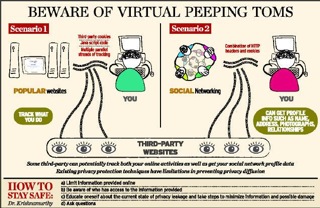
For instance, your visits to many popular websites are tracked. This means someone else (other than the site you are visiting) knows what you do there. Such companies, called aggregators, track your online behaviour to help marketing efforts.
These aggregators have been around for a long time, but most users are unaware of the current reach and enormity of this industry. A growing population (of around two billion users now) visiting popular sites tracked over many years — you do the arithmetic. Interestingly, most of the tracking and aggregation of this multi-billion dollar industry is done by a handful of companies.
In a 2008 paper, Dr. Krishnamurthy and Craig Wills of the Worcester Polytechnic Institute, U.S., reported that the penetration of the top 10 aggregators in tracking user-viewing habits across a large number of popular websites grew from 40 per cent in 2005 to 70 per cent. “Things have gotten worse as there has only been more aggregation,” he says.
The recent figure stands at 84 per cent, Dr. Krishnamurthy says, and at the top is Google with a penetration of 75 per cent.
Dr. Krishnamurthy and Dr. Wills found that when these aggregators tracked you on an online social networking site, your profile information such as age, address, photographs, and relationships, could “leak” to the aggregators. This they reported in a 2009 paper. So it is possible for the same set of aggregators to access both — data on online viewing habits and profile information. This implies these aggregators have the potential to link the two. The existing privacy protection techniques have limitations in preventing privacy diffusion, according to these researchers. So the answer to whether you have a choice in deciding who sees your data seems to be no in many cases.

Microsoft Windows 7 Phone passes 1.5 million mark


More than 1.5 million Windows Phone 7 devices have been sold in the six weeks since the smartphone went on the market, Microsoft announced Monday.
While far from the 300,000 daily activations attributed to the iPhone and phones powered by Google’s Android operating system, the Windows Phone sales figures met the company’s “realistic expectations”, Microsoft executive Achim Berg said in a web posting.
The phone is seen as Microsoft’s attempt to get its foot in the door of the smartphone market after years in which the technology giant was eclipsed by Google, Apple and RIM’s Blackberry.
Devices running Windows Phone 7 software are currently made by HTC, Dell, Samsung and LG and have been well reviewed by analysts.
“We all know that the competition is extreme in this industry, and we have to compete on multiple fronts,” said Berg, vice president of business and marketing for Windows Phones.
“We are on a path to begin releasing the first of several updates in the next couple of months, and several more mobile operators around the world will introduce Windows Phone 7 on their network in 2011.”

Apple removes Wikileaks app

Apple has removed a WikiLeaks app from its store on the grounds that it violated the company’s developer guidelines for applications for use on its iPhones and iPads, the company said Tuesday.
The action places Apple among a group of major U.S. companies who have cut ties or services to the whistle—blowing website and have subsequently been targeted by hackers sympathetic to WikiLeaks.
The 1.99—dollar app was initially released on Friday and allowed users of Apple’s iPad or iPhone devices to access WikiLeaks with a single click, rather than having to use a web browser to navigate to the site.
The app has no official ties with WikiLeaks, but its developer did promise to donate all the income to the site.
“We removed the WikiLeaks App from the App Store because it violated our developer guidelines,” said Trudy Muller, a spokeswoman for Cupertino, California—based Apple. “Apps must comply with all local laws and may not put an individual or target group in harm’s way.” Apple keeps strict tabs on the apps it offers, unlike the more open platform offered on rival Android phones, prompting some users to “jailbreak” their devices to circumvent the company’s restrictions.

Popular Posts

Search results